
Old mobile phones, laptops, tablets, chargers and other electronic gadgets often end up forgotten in drawers, cupboards and storage boxes. However, these unused devices can contain valuable materials that can be recovered, while some batteries and electronic components require careful handling.
In the UK, electronic waste is commonly known as WEEE, which stands for Waste Electrical and Electronic Equipment. Instead of throwing unwanted electronics into general rubbish, you can often repair, donate, sell or recycle them through suitable collection points.
This guide explains how to recycle old phones, laptops and gadgets in the UK, how to protect your personal information before handing over a device, and where to find a suitable recycling option.
What Is Electronic Waste?
Electronic waste includes electrical and electronic products that people no longer want or need. These products may be broken, outdated, damaged or replaced by newer models.
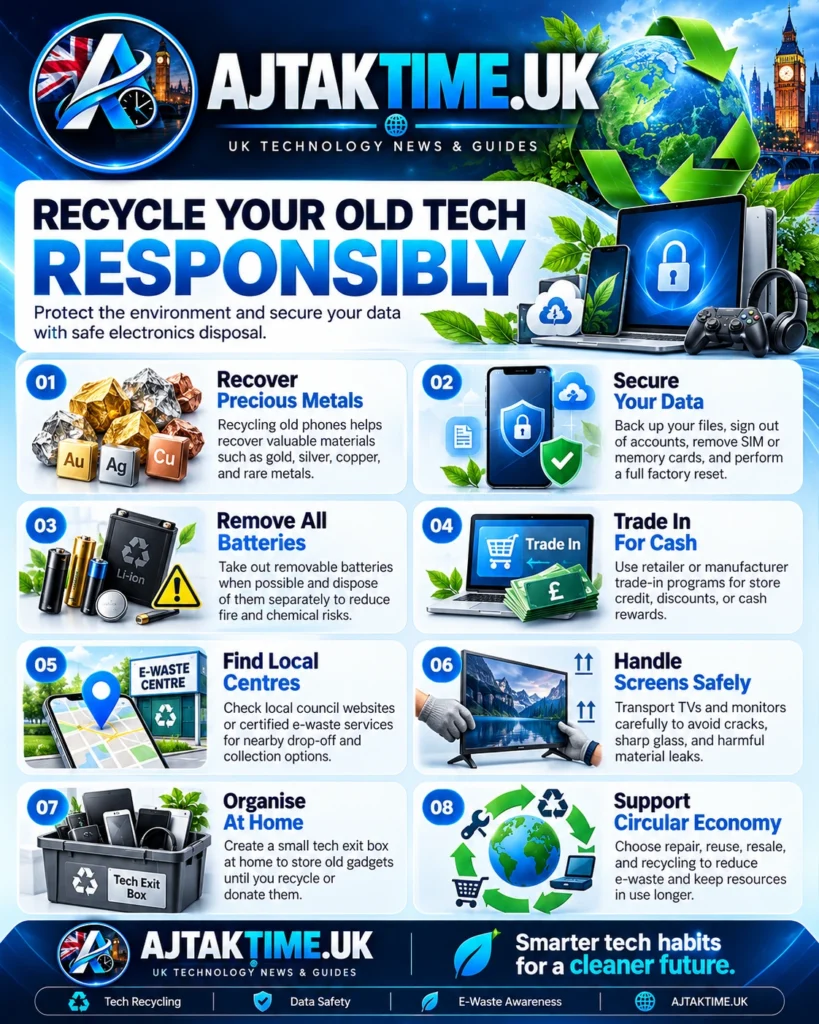
Common examples include:
- Mobile phones and smartphones
- Laptops, desktop computers and tablets
- Chargers, cables and power adapters
- Keyboards, mice and computer accessories
- Smartwatches, headphones and speakers
- Digital cameras and gaming controllers
- Routers, printers and other household electronics
- Small kitchen appliances and electronic gadgets
Many of these items contain metals, plastics and other materials that can be recovered through appropriate recycling processes.
The UK government advises consumers not to dispose of electrical products and batteries in ordinary household rubbish. The crossed out wheeled bin symbol indicates that a product should be collected separately for appropriate disposal or recycling.
Official guidance: GOV.UK: Recycling batteries and electrical waste.
Why Should You Recycle Old Electronics?
Recycling electronic devices correctly can benefit the environment, protect personal information and reduce unnecessary waste.
1. Recover valuable materials
Electronic products may contain copper, aluminium, steel, plastics and other materials that can be recovered and used in manufacturing new products.
Recovering these materials can reduce the need to obtain all raw materials from new sources.
2. Reduce environmental harm
Electrical products can contain substances that require controlled handling. Sending unsuitable electronics to general rubbish can create environmental risks when materials are damaged or improperly disposed of.
Approved recycling processes help separate components and manage materials appropriately.
3. Reduce battery fire risks
Some electronic devices contain lithium ion batteries. If these batteries are crushed, damaged or exposed to unsuitable conditions, they can overheat and catch fire.
For this reason, old phones, laptops, rechargeable gadgets and other battery powered electronics should be taken to suitable collection points rather than placed in general waste.
4. Give working devices a second life
A phone or laptop that is no longer useful to you may still work for another person. Repairing, selling or donating a usable device can extend its useful life before recycling becomes necessary.
How to Recycle Old Mobile Phones in the UK
<AsyncImage query=”old smartphones sorted for electronics recycling on a clean workbench sustainable technology editorial photograph” aspectRatio=”16:9″ width=”100%” />
Old mobile phones are among the easiest electronic devices to prepare for reuse or recycling. Even a phone with an outdated operating system may have value for spare parts or material recovery.
Step 1: Check whether the phone still works
If the phone is functional, consider selling it, trading it in or donating it through a suitable organisation.
If it has a broken screen, damaged charging port or weak battery, check whether repair is practical. A repair may allow the device to remain in use for longer.
Step 2: Back up your data
Before resetting your phone, save anything you want to keep, such as:
- Photos and videos
- Contacts and messages
- Important documents
- Authentication and recovery information
- Files stored locally on the device
Check that your backup is accessible before deleting anything from the phone.
Step 3: Remove personal information
Sign out of accounts where appropriate, remove your SIM card and take out any removable memory card.
Use the phone’s built in factory reset option after confirming that your important information has been backed up. Follow the manufacturer’s instructions for preparing the phone for resale or recycling.
For iPhones, consult Apple’s official guidance on preparing a device for sale, trade in or recycling.
For Android phones, use the manufacturer’s official instructions for removing accounts and performing a factory reset.
Step 4: Find a suitable recycling option
You can look for a local collection point through the Recycle Your Electricals recycling locator.
Some mobile networks, manufacturers and retailers also offer trade in, reuse or recycling programmes. Check their current terms, eligibility requirements and any charges before sending a device.
How to Recycle Old Laptops and Computers
Laptops and desktop computers can contain valuable materials, but they may also hold sensitive personal and business information.
Before recycling a computer, decide whether it can be reused, repaired or securely prepared for material recovery.
1. Back up important files
Copy essential documents, photographs, browser data and other files to a trusted backup destination.
If the computer contains business records, customer information or confidential projects, check any relevant data protection requirements before transferring or disposing of it.
2. Sign out of accounts
Sign out of personal accounts and services where appropriate. Remove the device from account management pages if the manufacturer or service provides that option.
If the computer is managed by an employer or organisation, contact the relevant IT administrator before attempting to erase or dispose of it.
3. Erase the storage drive
A normal file deletion or quick format may not securely remove all recoverable information.
For a Windows computer, review Microsoft’s instructions for resetting a PC:
Choose the appropriate reset option and follow the instructions for your version of Windows. If the computer contains highly sensitive information, use a suitable secure data destruction method or a reputable specialist service.
For devices that no longer turn on, do not assume that your data has been erased. Consider a professional data destruction service or a recycler that can explain how storage devices are handled.
4. Check the battery condition
If a laptop battery is swollen, leaking, unusually hot or physically damaged, do not attempt to puncture or dismantle it. Keep the device away from heat and combustible materials, and contact an appropriate battery or electrical waste collection service for handling advice.
Do not place a damaged lithium battery in ordinary household rubbish.
5. Choose an appropriate recycling service
Look for a local household waste recycling centre, an eligible retailer take back service or a suitable reuse and recycling organisation.
Before travelling, check whether the centre accepts laptops and computers, whether an appointment is required and whether any fees apply.
Where Can You Recycle Electronics in the UK?
There are several ways to find a suitable collection point. The best option depends on the device, your location and whether the item still works.
<box gap={3}> <row align=”start” gap={3}> <AsyncImage query=”UK household waste recycling centre dedicated small electrical waste collection bins” aspectRatio=”4:5″ maxWidth=”112px” /> <box flex=”1″ gap={1}> **1. Local household waste recycling centres**
  Many council operated recycling centres accept household electrical items. Check your council's website before visiting because accepted items, opening hours, booking rules and charges can vary.

  [Find recycling collection information on GOV.UK](https://www.gov.uk/recycling-collections)
</box>
</row> <divider color=”subtle” /> <row align=”start” gap={3}> <AsyncImage query=”electronics retailer recycling collection point for small electrical items in store” aspectRatio=”4:5″ maxWidth=”112px” /> <box flex=”1″ gap={1}> **2. Retailer take back schemes**
  When you buy a replacement electrical product, retailers generally must provide a free way to return an equivalent old item for recycling, subject to the applicable rules.

  Some larger electrical retailers must also accept qualifying small electrical items without requiring a new purchase. Check the retailer's arrangements before travelling.

  [Read the UK retailer take back rules](https://www.gov.uk/electricalwaste-producer-supplier-responsibilities/take-back-waste-in-store)
</box>
</row> <divider color=”subtle” /> <row align=”start” gap={3}> <AsyncImage query=”old mobile phones laptops and cables arranged for reuse donation technology recycling” aspectRatio=”4:5″ maxWidth=”112px” /> <box flex=”1″ gap={1}> **3. Reuse and donation organisations**
  Working phones, laptops and other devices may be suitable for donation or refurbishment. Check that the organisation accepts your particular item and ask how it handles personal data.

  [Find reuse and recycling points](https://www.recycleyourelectricals.org.uk/)
</box>
</row> <divider color=”subtle” /> <row align=”start” gap={3}> <AsyncImage query=”mobile phone trade in electronics recycling counter with used smartphone” aspectRatio=”4:5″ maxWidth=”112px” /> <box flex=”1″ gap={1}> **4. Manufacturer and mobile network programmes**
  Some manufacturers and mobile networks offer trade in, buy back or recycling services. You may receive payment or credit for an eligible device, but broken or older models may not qualify.

  Check the provider's current eligibility conditions, data preparation requirements and postage arrangements.
</box>
</row> </box>
Can You Recycle Chargers, Cables and Small Gadgets?
Yes. Many electrical items that people overlook can be reused or recycled through suitable collection schemes.
Examples include:
- USB and laptop charging cables
- Power adapters and extension accessories
- Computer mice and keyboards
- Headphones and portable speakers
- Digital cameras and remote controls
- Smartwatches and fitness trackers
- Small electronic toys and accessories
Do not assume that an item is too small to recycle. If it has a plug, battery or cable, check whether a local collection point accepts it.
Old cables can be collected together in a bag or box to make a recycling trip easier. However, keep loose batteries and damaged battery powered devices separate according to the collection point’s instructions.
How to Recycle Batteries Safely
Batteries need particular care because some can cause fires if damaged or crushed.
Remove batteries only when it is safe
If a battery is designed to be removed easily, follow the manufacturer’s instructions. Do not dismantle a device or force open a sealed battery compartment just to remove the battery.
Use a suitable battery collection point
Many supermarkets and other shops that sell qualifying portable batteries provide collection facilities. Household recycling centres may also accept batteries.
Check the collection point’s instructions for lithium batteries and other battery types.
Never put loose batteries in general rubbish
Avoid putting batteries in household rubbish or ordinary recycling bins. For lithium batteries, cover exposed terminals with suitable non conductive tape where the collection point recommends it, and follow its specific handling guidance.
If a battery is swollen, leaking, punctured or unusually hot, do not put it into an ordinary collection bin. Seek advice from an appropriate specialist service.
Official advice: GOV.UK guidance on recycling batteries and electrical waste.
Should You Sell, Donate, Repair or Recycle Old Electronics?
Recycling is not always the first option. If an item can safely continue to be used, repair or reuse may be worth considering.
| Option | Best for | What to check |
|---|---|---|
| Repair | Devices with fixable faults | Repair cost, parts and battery condition |
| Sell or trade in | Working phones, laptops and gadgets | Device condition, eligibility and data removal |
| Donate | Working equipment another person can use | Recipient requirements and data security |
| Recycle | Broken, obsolete or unwanted items | Accepted devices and safe handling procedures |
Before donating or selling electronics, remove personal data and make sure the recipient or service can safely handle any faulty batteries.
For businesses, schools and other organisations disposing of multiple computers or storage devices, use an appropriate specialist service and maintain records where required.
Common Mistakes to Avoid When Recycling Electronics
Throwing electronics into general rubbish
Electrical products and batteries should be taken to appropriate collection points rather than placed in ordinary household rubbish.
Forgetting to erase personal information
Phones and computers may contain emails, photographs, saved passwords and financial information. Back up important files, then erase the device using an appropriate method.
Assuming every recycling point accepts every device
A collection point may accept small gadgets but not laptops, large appliances or damaged batteries. Check its accepted items before visiting.
Sending damaged batteries through ordinary post
Do not post a swollen or damaged battery as if it were an ordinary electronic item. Follow the carrier’s and recycling provider’s specific instructions for safe transport.
Ignoring working equipment
If a device can be safely repaired, reused or donated, consider these options before recycling it for materials.
Frequently Asked Questions
Can I recycle old mobile phones for free in the UK?
Many local recycling centres, retailer schemes and other collection points accept phones without charging households. However, arrangements vary, so check the specific service before visiting.
Can I put an old laptop in my household recycling bin?
You should not put a laptop in a normal household recycling bin unless your local authority explicitly provides a suitable collection arrangement. Use an appropriate electrical waste collection point instead.
Do I need to remove my SIM card before recycling a phone?
Yes, remove your SIM card and any removable memory card before handing over the phone. Back up important information and securely erase personal data as appropriate.
Can I recycle broken electronics?
Yes. Broken electronics may still be suitable for material recovery, but damaged batteries require special care. Check whether the collection point accepts the item in its current condition.
Where can I find my nearest electronics recycling centre?
Use the Recycle Your Electricals locator to look for local reuse and recycling points. You can also check your local council’s website for household recycling facilities.
Are retailers required to accept old electrical products?
UK rules generally require retailers to offer a free take back route for an equivalent old electrical item when a new product is purchased, subject to the applicable requirements. Certain larger retailers must also accept qualifying small electrical items without a new purchase. Check the official rules and retailer arrangements for details.
Final Thoughts
Recycling old phones, laptops and gadgets in the UK does not have to be complicated. Start by deciding whether each item can be repaired, sold, donated or recycled. Then back up your important files, remove personal information and find a collection point that accepts the device.
Remember to handle batteries carefully and never put unwanted electronics into general household rubbish. Using the right recycling service helps recover useful materials and reduces avoidable waste.
Editorial note: Recycling arrangements vary by local authority, retailer and device type. Check the relevant collection service’s latest instructions before travelling or handing over a damaged electronic device.